
Employers of CDL and CLP drivers must run a full Clearinghouse query before hiring and at least one query, limited or full, annually for each current driver on the payroll. That obligation only kicks in once you’ve purchased a query plan directly from FMCSA, since a Consortium/Third-Party Administrator (C/TPA) can’t buy one for you. Get the query type and consent process wrong, and you’re out of compliance even if you ran a query.
TL;DR:
- Employers must purchase and manage query plans directly through FMCSA, as third-party administrators cannot buy or fund these plans for them.
- Full queries are required for pre-employment checks, while limited queries suffice for routine annual monitoring of current drivers.
- Query results indicating “Record(s) found” require prompt action within 24 hours to either complete a full query or remove the driver from safety-sensitive duties.
- Misentered driver information, especially CDL numbers, is the most common cause of query failures and can be fixed with a verified, accurate record check.
- Combining query timing with fast, same-day drug testing and RTD process coordination minimizes driver downtime and maintains compliance.
Table of Contents
- Understanding FMCSA Clearinghouse Queries: Limited vs Full
- When Employers Must Run Clearinghouse Queries
- How to Buy and Manage FMCSA Clearinghouse Query Plans
- How to Conduct FMCSA Clearinghouse Queries Step by Step
- What Clearinghouse Query Results Actually Mean
- Query History, Recordkeeping, and Audit Downloads
- Fixing Common Clearinghouse Query Problems
- Running FMCSA Clearinghouse Queries Without Creating Downtime
- Author Note: A Compliance-First Perspective From a DOT Testing Provider
- Total Tox Supports Your Clearinghouse Compliance Timeline
- Official FMCSA Resources Worth Bookmarking
- Sources
Understanding FMCSA Clearinghouse Queries: Limited vs Full
Every FMCSA Clearinghouse query falls into one of two categories, and mixing them up is the single most common compliance mistake employers make. A limited query tells you whether a record exists. A full query tells you what’s actually in it.
Limited queries check whether a driver’s Clearinghouse file contains any drug or alcohol violation information, but they don’t reveal the details. You get a yes-or-no answer: either “no records found” or “records found.” The consent for a limited query is general, written, and can cover multiple queries over multiple years, according to FMCSA’s own guidance on the distinction. That’s what makes limited queries the workhorse tool for annual checks on drivers already in your fleet. You collect one signed consent form when a driver is hired, and it covers you for repeat limited queries as long as it stays valid and the driver hasn’t revoked it.
Full queries are a different animal entirely. They disclose the actual violation details and Return-to-Duty (RTD) process status, including whether a driver has completed the steps required to return to safety-sensitive work. Because full queries expose sensitive information, FMCSA requires the driver’s electronic consent submitted through the Clearinghouse itself, not a paper form kept in a file drawer. That consent has to be given per request; there’s no multi-year blanket version for full queries.
Here’s where the billing gets a little tricky, and it trips up a lot of first-time users:
- A limited query and a subsequent full query, when run as a linked pair after a “Record(s) Found” result, get billed as one combined transaction rather than two separate charges.
- Running a standalone full query, such as for a new hire’s pre-employment check, is billed on its own.
- Each transaction draws from your purchased query plan balance regardless of type. So tracking usage matters more than tracking transaction count.
The practical takeaway: use limited queries for your routine annual checks on current drivers, since the consent overhead is lower and the cost structure rewards it. Reserve full queries for pre-employment screening, where the regulation requires the full version outright, and for any case where a limited query comes back positive and you need the underlying detail to decide what happens next.
When Employers Must Run Clearinghouse Queries
The timing requirements come straight from federal regulation, not from FMCSA’s own preference, and they apply to every employer of CDL or CLP holders operating in safety-sensitive functions.
Under 49 CFR 382.701, the rule breaks into two clear triggers:
- Pre-employment: before you let a prospective driver perform any safety-sensitive function, you must run a full query on that individual. A limited query does not satisfy this requirement; it has to be full.
- Annual: for every currently employed CDL or CLP driver, you must run at least one query, limited or full, within each 12-month period.
That 12-month window is measured from the date of the driver’s last query, not the calendar year, and not their hire date. If you ran a driver’s annual query on March 10, 2026, your next one is due no later than March 10, 2027. Employers who batch all their annual queries in January regardless of individual hire or last-query dates often end up running some drivers early and others dangerously close to lapsing. Building a rolling schedule tied to each driver’s actual last-query date avoids that gap.
A few other situations that call for a query outside the two mandatory triggers:
- Rehiring a driver who previously worked for you and left, since their record may have changed in the interim.
- Onboarding a driver through a staffing agency or leasing arrangement, where the leasing carrier and the motor carrier may both have query obligations depending on who controls the safety-sensitive function.
- Any internal transfer that moves an employee into a CDL safety-sensitive role for the first time.
Coverage extends to anyone required to hold a CDL for the position, including part-time and seasonal drivers, not just full-time fleet employees. If you run a construction operation or manufacturing site with a handful of CDL-holding equipment operators, the same query obligations apply to them as they would to a long-haul carrier’s entire roster.
How to Buy and Manage FMCSA Clearinghouse Query Plans
You can’t run a single query, limited or full, without an active balance on a purchased query plan, and FMCSA is specific about who’s allowed to buy one.
Query plans are purchased directly by the employer on the FMCSA Clearinghouse site, not through a C/TPA. That restriction surprises a lot of employers who outsource their drug and alcohol program administration and assume the C/TPA handles everything, including the query budget. It doesn’t work that way here. The employer’s own login has to make the purchase, even if a C/TPA later runs the actual queries on the employer’s behalf using authorized access.
Pricing runs on a flat per-query rate rather than a subscription or seat-based model. FMCSA offers bundle sizes so employers with larger rosters can buy queries in bulk at a lower effective cost per query than buying one at a time. A fleet running 40 CDL drivers through annual queries plus a steady stream of new hires burns through a small bundle fast, so matching bundle size to your actual driver count and turnover rate saves you from repeat purchase transactions throughout the year.
A few practical notes on managing the balance:
- Query plan funds don’t expire, so there’s no penalty for buying a larger bundle upfront if your driver count is stable.
- Combined limited-to-full transactions draw one charge from your balance, not two, which affects how you forecast usage.
- Multiple authorized users at your company can draw from the same plan balance, so track usage centrally rather than per-user to avoid surprise depletion.
It’s cheaper to buy the right bundle once than to keep topping off a plan that ran dry mid-audit.*
How to Conduct FMCSA Clearinghouse Queries Step by Step
Running queries correctly comes down to sequence and data accuracy. Get the driver’s information wrong at the start and the whole process stalls.
Before you start, confirm three things: your company is registered in the Clearinghouse under its USDOT number, you or your authorized staff have login.gov credentials linked to that registration, and the right user roles are assigned if more than one person at your company handles compliance tasks. Employers who skip proper user-role setup often find themselves locked out of query functions during a time-sensitive hire.
Running a single limited query
- Log in to your employer dashboard and navigate to the query function.
- Enter the driver’s information exactly as it appears on their CDL, including full legal name, date of birth, and CDL/CLP number with the state’s exact formatting.
- Submit the query. Limited queries typically return results immediately, showing either “no records found” or “records found.”
- If the result is “no records found,” document it and move on. No follow-up action is required.
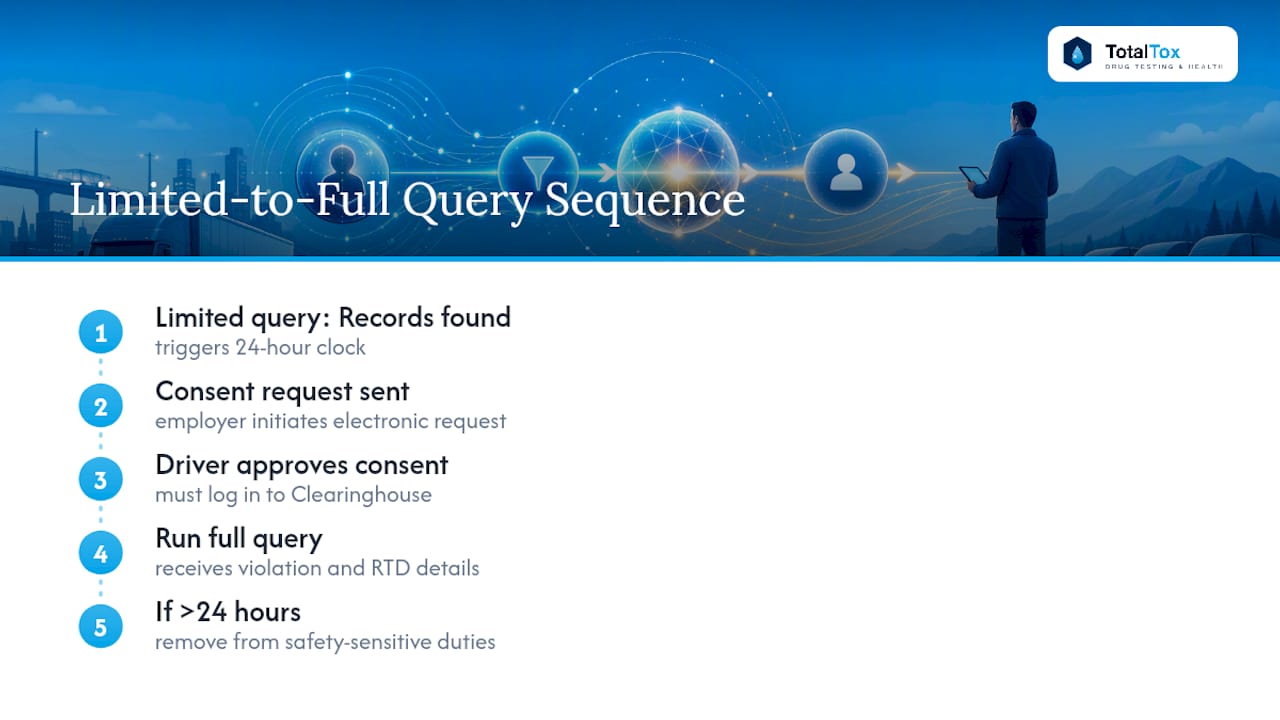
- If the result is “records found,” you have 24 hours to submit a full query request or remove the driver from safety-sensitive duties.
Driver data mismatches are the number one cause of failed or delayed queries, according to FMCSA’s own guidance on common query problems. A CDL number entered with an extra space, a missing leading zero, or a middle initial where the license shows a full middle name will bounce the verification. Pull the actual physical license or a clean scan before entering data, rather than typing from memory or an old HR file.
Moving from limited to full query
When a limited query comes back positive, the clock starts. You need the driver’s electronic consent submitted inside the Clearinghouse system itself, not a paper signature. The system sends the driver a consent request; they log in to their own Clearinghouse account and approve it. Once approved, you run the full query and get the complete violation and RTD status detail. The entire limited-to-full sequence has to complete within 24 hours of the “records found” result, or the driver must be pulled from safety-sensitive functions until it does.
Full pre-employment queries for new hires
For a new hire, skip the limited query step entirely and go straight to a full query, since pre-employment checks require the full version by regulation. That means you need the prospective driver’s electronic consent before you can submit the query, which is one more reason to build Clearinghouse consent collection into your standard offer or onboarding paperwork rather than treating it as an afterthought once the person has already started.
Bulk queries for larger rosters
Employers running annual queries across a large driver roster can use the bulk upload feature instead of entering each driver one at a time. This requires a template file, available through FMCSA’s job aids for employers, with columns for each required driver identifier. A handful of practical rules make bulk uploads go smoothly:
- Match the CDL number format exactly to how each driver’s issuing state formats it. States vary widely, and a format built for one state’s licenses will fail validation against another’s.
- Test with a small sample file, five or ten drivers, before submitting your full roster. Catching a formatting error in a ten-row file is a lot less painful than debugging it across four hundred rows.
- Review the error report the system generates after upload. Most bulk failures trace back to one or two consistent formatting issues you can fix and resubmit in minutes.
FMCSA’s employer job aids include screenshots walking through each of these screens, which are worth bookmarking the first time you set up your query workflow, since the dashboard’s layout isn’t always intuitive on a first visit.
What Clearinghouse Query Results Actually Mean
A query result isn’t just a data point, it’s a trigger for specific employer action, and treating every result the same way is how compliance gaps happen.
No records found / driver not prohibited. This is the outcome you want and the one that requires nothing further from you. Document the query date and result in the driver’s file and move on to your next scheduled check.
“Record(s) Found” on a limited query. This result gets misread constantly. It does not mean the driver is prohibited from driving. It means the Clearinghouse has violation information on file, and you don’t know what that information is until you run a full query. Treating “Record(s) Found” as an automatic disqualification is both legally wrong and operationally reckless, since it could mean anything from a fully resolved violation years ago to an active, unresolved one.
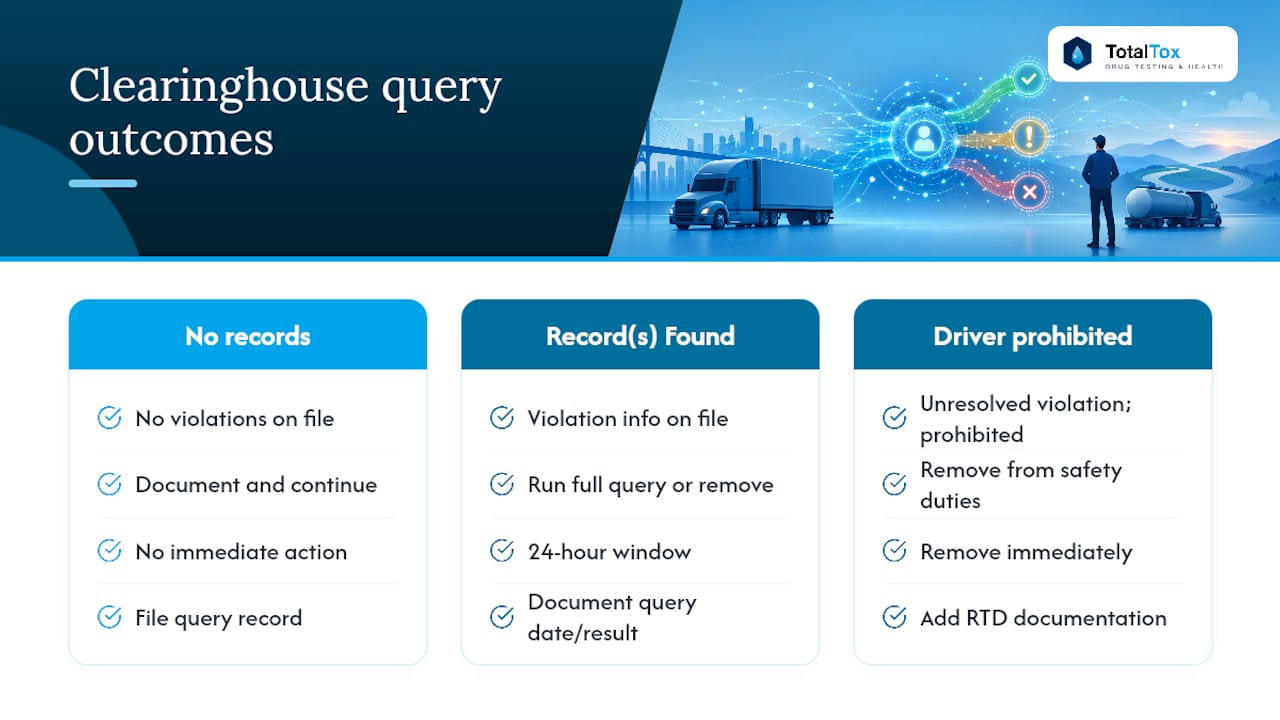
“Driver prohibited.” This is the result that changes everything immediately. A driver in prohibited status has an unresolved violation and has not completed the Return-to-Duty process. Federal rules require you to remove that driver from all safety-sensitive functions the moment you have this information, and they stay removed until they’ve completed RTD requirements with a Substance Abuse Professional (SAP) and returned a documented negative test.
The 24-hour rule is the piece of this process most likely to create real business exposure. Per FMCSA’s own factsheet on query timing, once a limited query returns “Record(s) Found,” you have exactly 24 hours to either complete the full query or remove the driver from safety-sensitive duty. There’s no grace period for a slow consent response from the driver or a busy HR week.
A driver stuck in limbo between a positive limited query result and a completed full query isn’t a paperwork problem, it’s a driver you may be required to pull from the road within a single business day.
Building the RTD documentation into your driver qualification file the moment a prohibited status appears, rather than scrambling for it during an audit months later, saves enormous time when a DOT inspector or your own insurance carrier comes asking.
Query History, Recordkeeping, and Audit Downloads
Every query you run gets logged automatically, and pulling that history is far easier than most employers realize until they actually need it for an audit.
The Query History page on your employer dashboard lets you filter past queries by date range, driver, and query type. You can search a specific driver’s full query timeline in seconds instead of digging through separate consent forms and results screenshots saved in different folders.
Downloading your records is straightforward:
- Filter the Query History view to the date range or driver set you need.
- Export the filtered results as an Excel file directly from the dashboard.
- The export includes query dates, query type, consent status, and results, which map cleanly onto the fields DOT auditors expect to see in a driver qualification file.
Retention practice matters here as much as the download itself. Keep exported query records for the full duration you retain the rest of a driver’s qualification file, and store them alongside, not separate from, the driver’s other DOT compliance paperwork. When a driver leaves and their file gets archived, the Clearinghouse query history should travel with it rather than staying siloed in a compliance officer’s personal downloads folder where it’s easy to lose track of during a personnel transition.
Fixing Common Clearinghouse Query Problems
Most query failures aren’t regulatory problems, they’re data-entry problems, and most of them have a fast fix once you know where to look.
Verification errors. The system rejects a query when the driver information you entered doesn’t exactly match Clearinghouse records. Nearly all of these trace back to CDL number formatting differences between states, according to FMCSA’s own tips on conducting queries. Pull the physical license again, check for extra spaces or transposed characters, and re-enter the exact string as printed.
Consent request failures. If a driver’s electronic consent request for a full query stalls or shows an error, you generally have two options: cancel the pending request and re-enter it fresh, or resend the existing request. A stalled request usually clears with a cancel-and-reenter rather than a resend, particularly when the original submission had a data mismatch buried in it. Query credits aren’t typically consumed by a failed or canceled consent request itself, only by a completed query transaction, but confirm your balance afterward to be sure nothing drew down incorrectly.
Missing the 24-hour window. If the deadline passes before you’ve completed a full query after a positive limited query result, remove the driver from safety-sensitive duty immediately and document exactly when and why the delay happened. Complete the full query as soon as possible afterward. A documented, promptly corrected miss looks very different to an auditor than an unexplained gap in your records.
- Double-check state-specific CDL formatting before every bulk upload.
- Cancel and re-enter rather than repeatedly resending a stalled consent request.
- Document any missed deadline immediately, with a timestamp and the corrective action taken.
- Contact Clearinghouse support with your USDOT number, the driver’s identifiers, and a screenshot of the error when self-fixes don’t resolve it within a business day.
Pro Tip: Keep a one-page internal reference showing exact CDL formatting conventions for every state your drivers are licensed in. It takes twenty minutes to build and eliminates the single most common source of query rejections.
Running FMCSA Clearinghouse Queries Without Creating Downtime
The regulatory side of Clearinghouse queries is well documented. What’s less discussed is how the operational side connects to your testing program, and that gap is where employers lose the most time.
Link every downloaded query record and every MRO-reviewed test result to the same driver qualification file. When an auditor asks for a specific driver’s compliance history, you want the query export, the consent documentation, and the test result sitting in one place, not scattered across three different systems that don’t talk to each other.
Build a playbook for the moment a query returns “Record(s) Found,” because that’s the moment your clock starts and your options narrow. The fastest sequence looks like this: submit the electronic consent request for the full query immediately, start parallel coordination with a SAP for the Return-to-Duty path the same day, and schedule same-day testing with a rapid-turnaround provider so the driver isn’t sitting in limbo for a week waiting on lab logistics. Employers who wait to start RTD coordination until after the full query completes routinely lose days they didn’t need to lose.
Fast testing turnaround matters most in exactly this scenario. A driver pulled from safety-sensitive duty after a “Driver prohibited” result needs a documented RTD test path started immediately, and the difference between a same-day test with next-day MRO review and a multi-day lab queue can mean a week of unnecessary downtime for one driver and one truck. Our own experience running walk-in DOT drug testing for employers across the transportation, construction, and healthcare sectors backs this up consistently: the employers who treat Clearinghouse compliance and testing speed as one connected workflow, rather than two separate departments, close out RTD situations days faster than those who don’t.
Author Note: A Compliance-First Perspective From a DOT Testing Provider
The Clearinghouse rules themselves are clear enough on paper. Where employers actually get hurt is in the gap between a query result and the paperwork that has to follow it fast. A “Record(s) Found” status doesn’t stop the clock, it starts one, and every hour spent figuring out what to do next is an hour a driver sits idle and a truck stays parked.
Speed and documentation aren’t separate priorities here, they’re the same priority. The fastest fix for HR teams: build your RTD and testing response plan before you need it, not while a driver is sitting in the parking lot waiting on you.
— Total Tox
Total Tox Supports Your Clearinghouse Compliance Timeline
Walk-in drug testing providers can be an alternative to waiting on a lab appointment when a Clearinghouse result puts a driver’s Return-to-Duty clock on the line. Some providers complete tests quickly without appointments and deliver results within 24 hours with MRO review, helping minimize the gap between a “Driver prohibited” result and a documented RTD test.
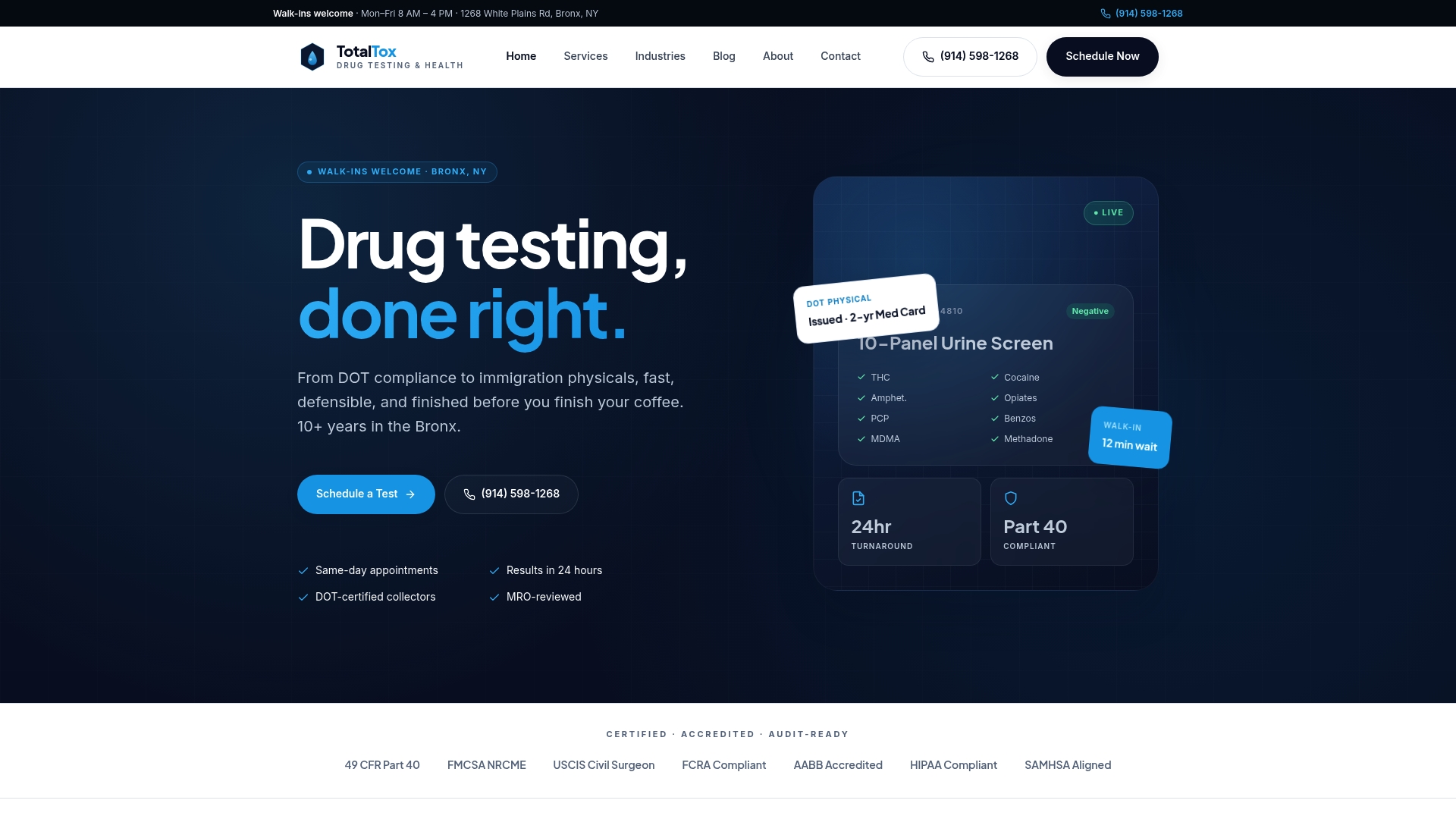
Our DOT drug testing and physical exam services cover the full range employers need to close out a Clearinghouse-driven testing requirement: urine, saliva, and hair testing, DOT physicals, and audit-ready documentation that maps directly onto a driver qualification file. We’ve served transportation, construction, healthcare, and manufacturing employers across the Bronx for over 10 years, and our industries served page breaks down what that looks like sector by sector. When a query result forces your hand, contact Total Tox to schedule same-day testing and keep your driver, and your compliance file, moving instead of stuck.
Official FMCSA Resources Worth Bookmarking
Keep these official pages saved alongside your internal compliance procedures, since FMCSA updates its guidance and job aids periodically without much fanfare.
Start with the Clearinghouse Query Plans page for pricing and purchase, and the Queries and Consent FAQ for consent-specific edge cases not covered above. The Query History job aid walks through downloading records for audits, and FMCSA’s regulatory guidance on query timing spells out the 49 CFR 382.701 requirements in full. Bookmark all four; you’ll reference them more than once a year.